Review a Booking Request
This guide shows you how to review a meeting-room request in Bookings Awaiting Approval, check the applicant, time slot, and approval history, and then approve or return the request.
An employee requests “8F Begonia Meeting Room” for August 18, 10:00–11:00. You are the assigned approver and need to verify that the request has no conflicts before deciding what to do.
Before you start
- Sign in to the administrator site, complete email verification, and confirm that you are assigned as an approver for this request.
- Know the room rules and which information must be checked before approval.
- If information is missing, prepare a clear reason for returning the request.
Steps
1. Find the request awaiting approval
In the administrator site, open Bookings Awaiting Approval. Each row represents a request that requires your action and shows its status, ID, creation time, applicant, type, resource, and total. Requests to join a service site may also appear here.
Find the request for “8F Begonia Meeting Room,” then verify the applicant and booking ID so that you do not process another request for the same room.
2. Review the details
Select the request to open its booking details. Check:
- Ordered item, date, time slot, and quantity.
- Applicant name and contact information.
- Notes or additional fields completed by the applicant.
- Completed and pending steps in Approval History.
- If a handling workflow is configured, confirm that this request is currently in the approval stage; approval and settlement are separate actions.
If required information is missing, do not infer what the applicant meant. Return the request and state exactly what needs to be added.
3. Write an approval comment
In Comment, leave enough detail for the applicant and the next approver to understand your decision. For example:
- Approve: “The time slot and room rules have been verified.”
- Return: “Please add the number of attendees and confirm whether video equipment is required.”
A comment is required when returning a request and is also recommended when approving it. Avoid vague comments such as “OK” or “Incorrect information.”
4. Approve or return the request
Choose one action:
- Approve completes your approval step. If another approver follows you, the request continues to wait for that person; approval at this step does not necessarily complete the workflow.
- Return to Applicant sends an incomplete or noncompliant request back for correction. Explain the required changes in Comment.
Before submitting, verify the booking ID and selected action one more time. The decision affects the applicant and should not be assumed to be reversible.
Verify the result
Confirm that:
- The request has left your current pending list or its status has changed.
- Approval History records your action and time.
- If another approver follows, the workflow identifies that person as the next owner.
- The applicant can see the latest status in My Bookings (Booking History).
If the booking also has a handling workflow, the assigned handler should continue from Settle Bookings in Progress after the configured settlement time.
Troubleshooting
The request does not appear
Confirm that you are signed in with the assigned approver account and viewing the correct service site. The request may not have reached your approval level yet, or another approver may already have processed it.
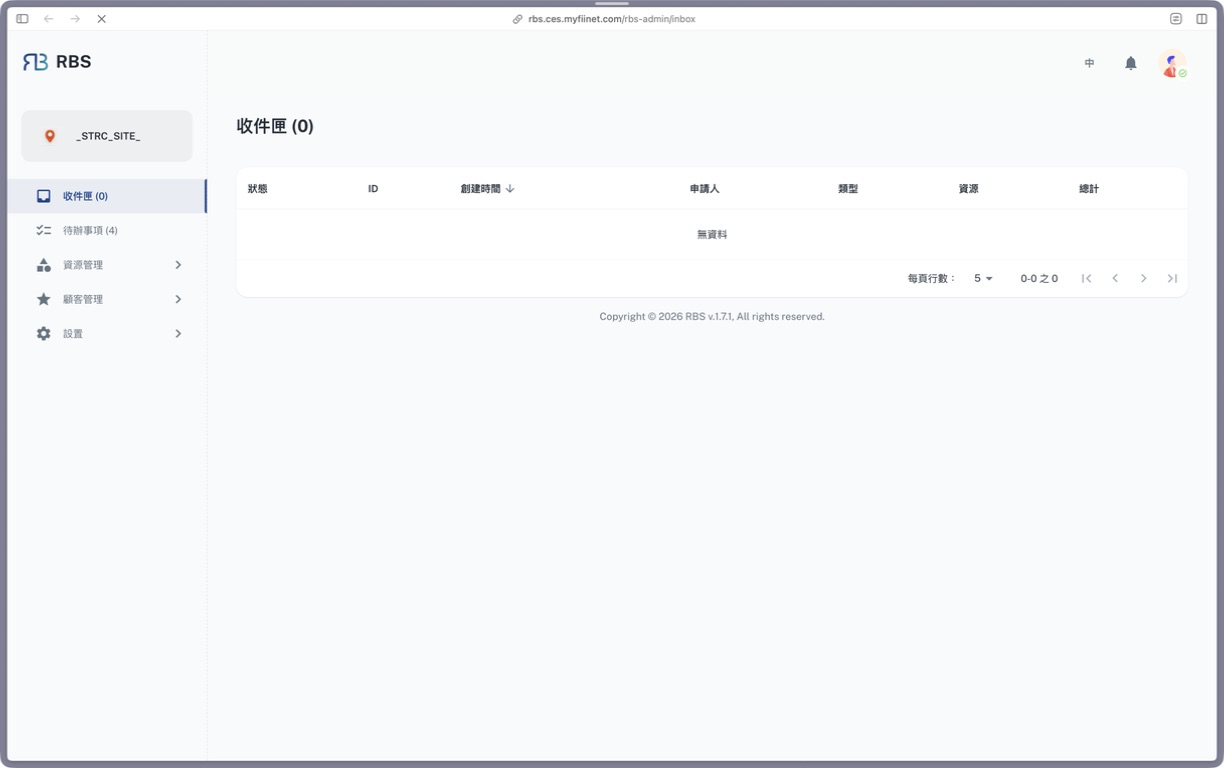
When there is nothing to review, “No Data” appears and the count on the left is 0. The screenshot is from the Traditional Chinese administrator site, v1.7.1; “收件匣” corresponds to Bookings Awaiting Approval in this guide.
It still says pending after approval
Another approver or handling step may follow yours. Open Approval History to identify the current owner, and do not submit the approval again.
The request is incomplete
List the missing information in Comment, then choose Return to Applicant. Do not approve first and request the missing information through a separate channel.
The action buttons are disabled
Confirm that the request is still assigned to you and has not been processed in another window or by another approver. If the actions remain unavailable, record the booking ID, current status, and time of the issue for the system administrator.
Next
- To change approvers or approval levels, see Customize Approval Groups.
- To process bookings that have reached their settlement time, open Settle Bookings in Progress.