Resource
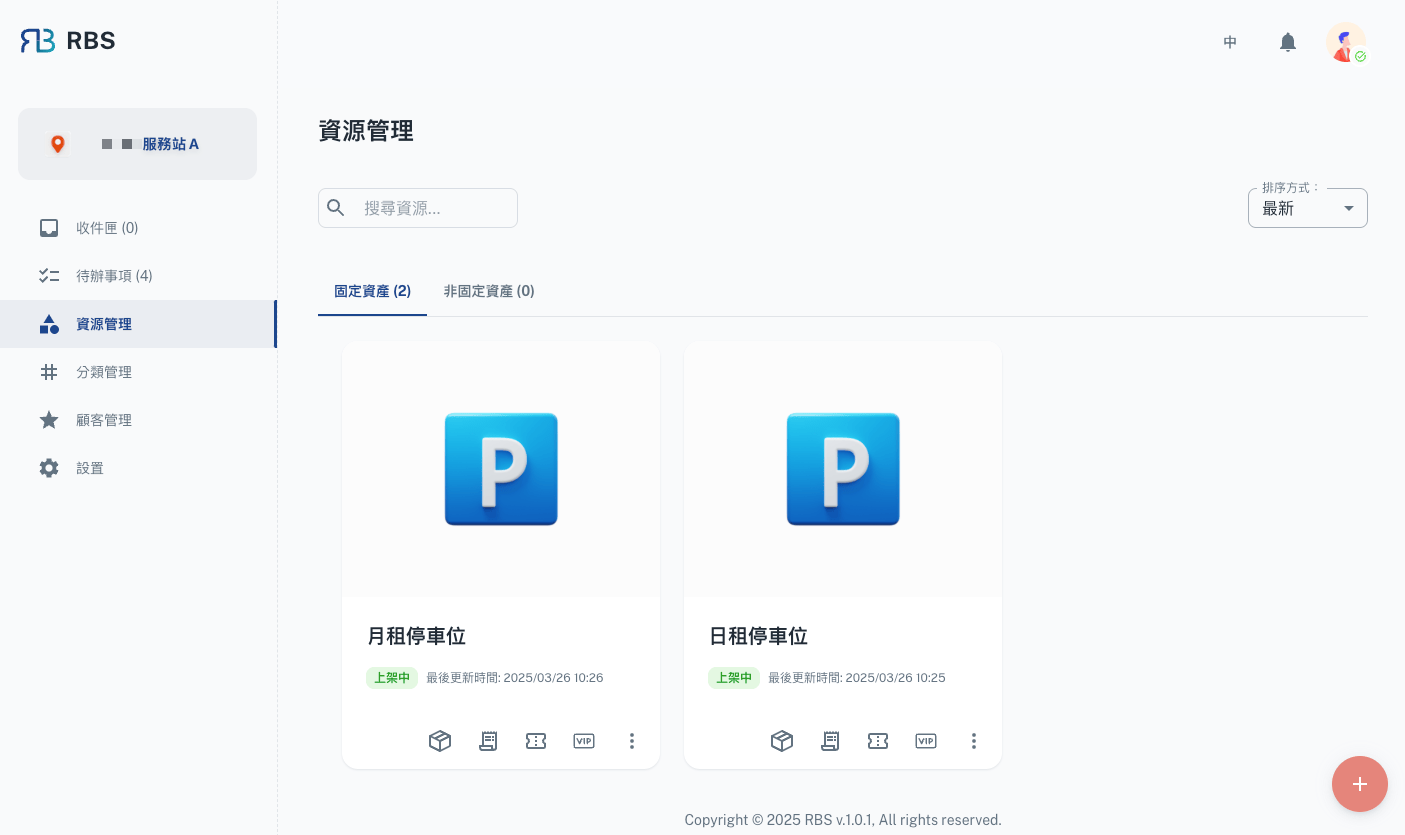
Resource Management is the central hub in the RBS Admin Portal for managing your organization's resources. Efficiently add, edit, organize, and optimize resource allocation to eliminate conflicts and maximize utilization.
Functions

| Function | Description |
|---|---|
| 🛠️ Items | Manage individual items associated with a resource (Create, Read, Update, Delete). |
| 📦 Orders | View and manage orders related to the resource. |
| 📅 Reservations | Oversee and manage resource reservations. |
| ⭐ VIP Reservations | Manage exclusive bookings for VIP users. |
| 🚦 Release/Unrelease | Control resource availability. |
| ✏️ Edit | Modify resource details. |
| 🗑️ Delete | Remove a resource from the system. |
These functions provide a comprehensive toolkit for managing resources effectively, ensuring that they are utilized efficiently and meet the organization's needs.
Details
Basic Info
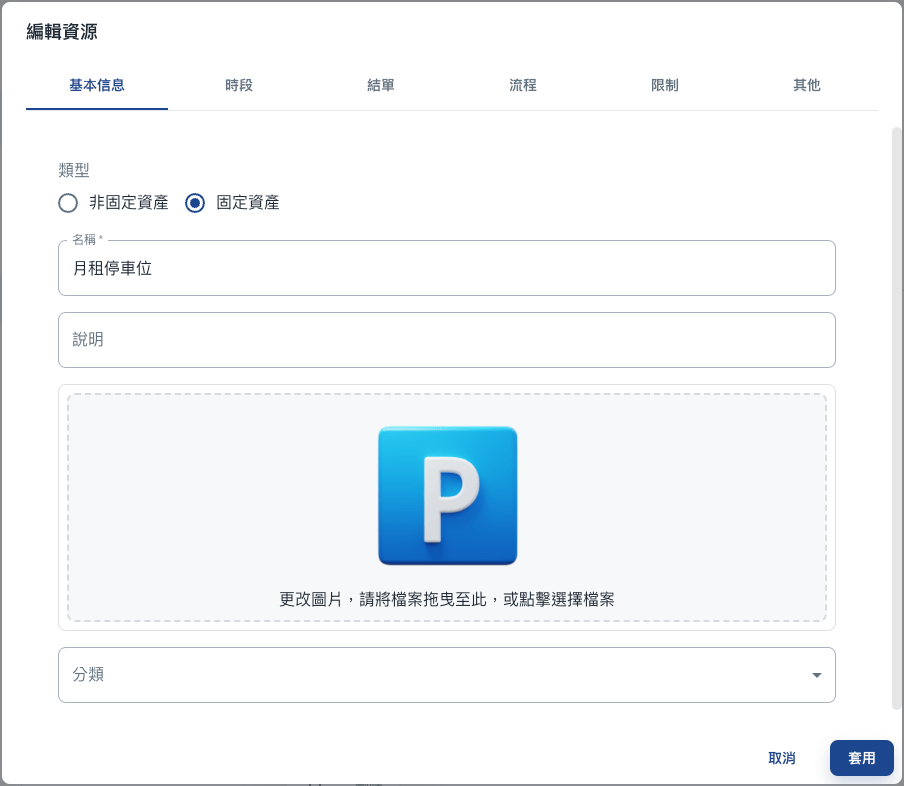
Configure essential resource attributes in the 'Basic Info' section:
- 📌 Type: Fixed (e.g., parking lot) or Unfixed (e.g., meal booking).
- 📝 Name: The resource's name for easy identification.
- 📢 Bulletin Messages: Display important messages related to the resource.
- 🖼️ Images: Visual context for the resource.
- 📂 Groups: Categorize and organize resources.
These settings streamline resource identification and enhance the user experience.
Time Period

The 'Time Period' section allows administrators to define and manage the availability of resources effectively. Key features include:
- 📅 Date Range: Specify a date range for when the resource will be available. If no range is set, the resource remains available indefinitely.
- 🚫 Close Weekends: Easily configure the resource to be unavailable on weekends.
- Fixed Assets
- Unfixed Assets
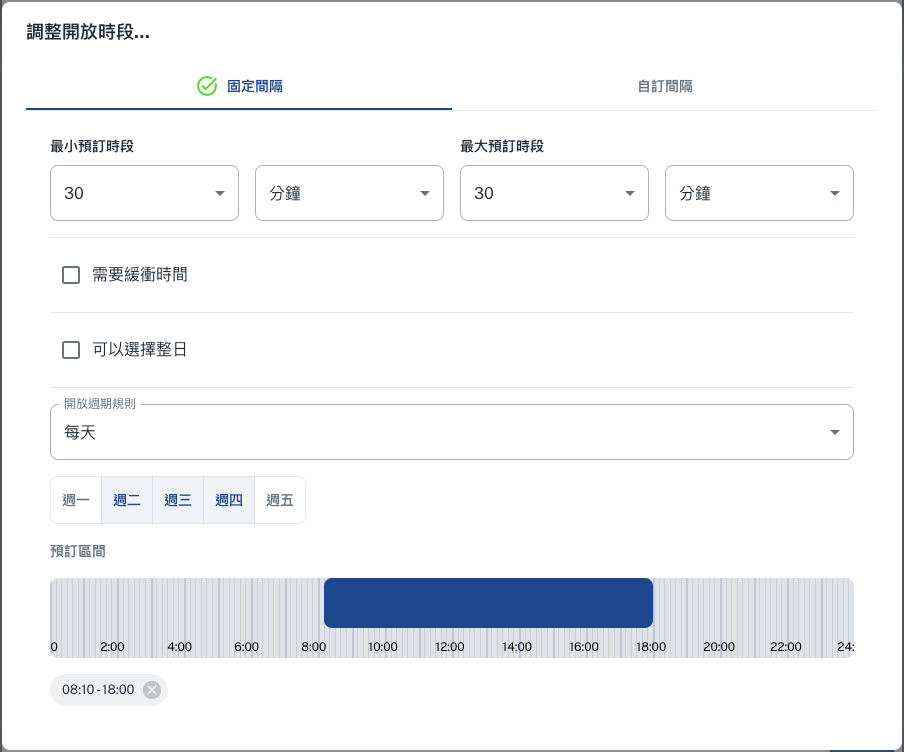
- 🕒 Time Slots: Define specific time slots for resource availability in the 'Adjust Opening Hours' section.
- ⏰ Default Booking Time: Configure a default booking time for a consistent booking process.
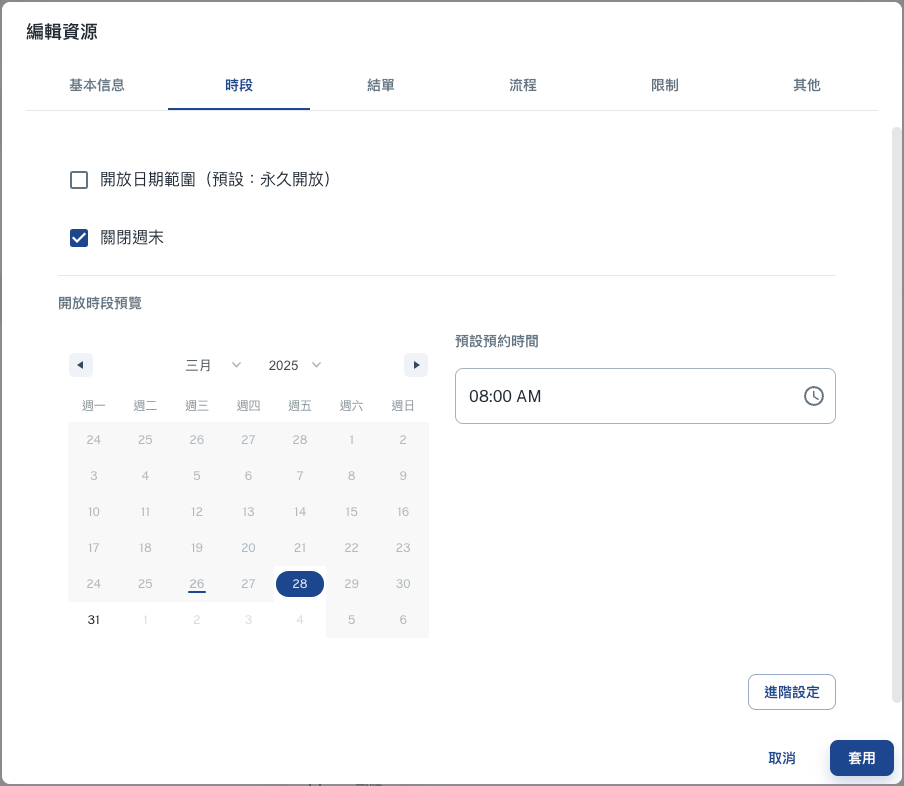
- 📜 Preview Schedule: View a clear and concise preview of the resource's availability schedule, ensuring transparency and accuracy.
Advanced Settings
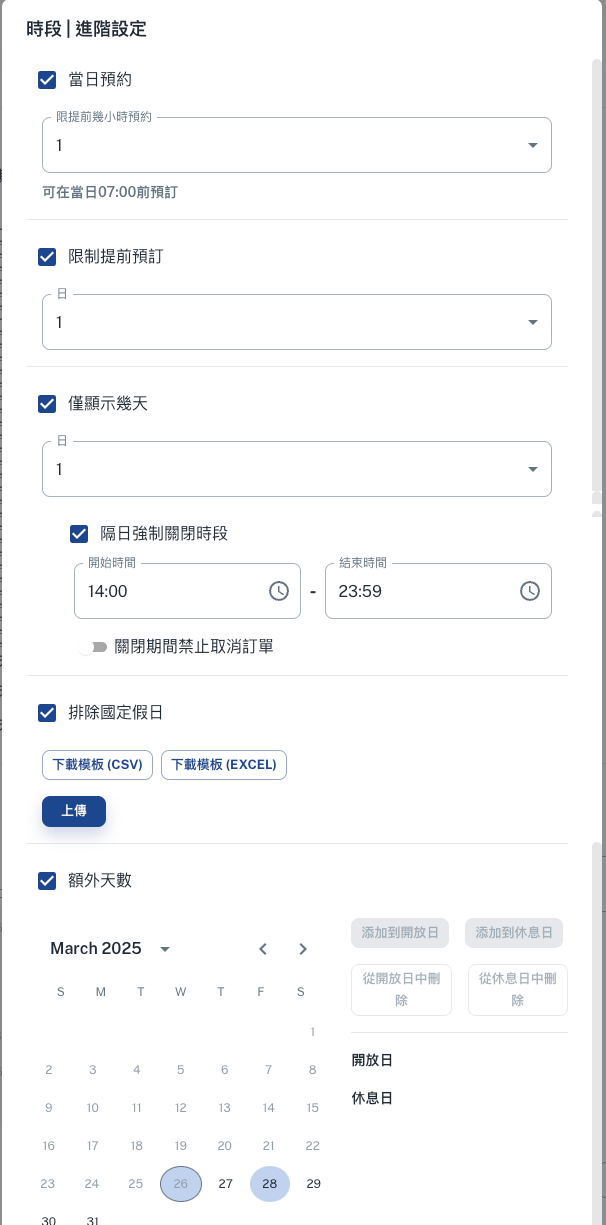
The 'Advanced Settings' section offers additional configuration options to fine-tune resource management. Key features include:
- 📆 On-Day Booking: Limit how far in advance users can book the resource to ensure fair access and prevent overbooking.
- ⏳ Advance Booking Restriction: Set a minimum lead time for bookings, allowing administrators to prepare resources effectively.
- 📅 Display Limited Days: Configure the number of days shown in the booking interface for a clear and concise user experience.
- 🔒 Next-Day Closure Period: Define specific time periods when the resource is unavailable, such as for maintenance or holidays.
- 📂 Exclude National Holidays: Automatically remove national holidays from the resource's availability to simplify scheduling.
- 📅 Additional Days: Add extra opening or closing days to customize the resource's schedule as needed.
These advanced settings empower administrators to implement precise controls over resource availability, ensuring efficient and effective management.
Settlement

The 'Settlement' section allows administrators to configure how bookings are finalized and processed. When the specified settlement time is reached, the system will automatically send the booking details to the administrator's to-do list for review and action. This ensures that all bookings are accounted for and handled efficiently.
Key features include:
- ⏰ Daily Settlement Time: Administrators can set a specific time for daily settlement. At this time, all bookings made for the resource will be compiled and sent to the admin's to-do list.
- 🔄 Automated Process: The system automates the settlement process, reducing manual effort and ensuring accuracy in booking management.
This feature streamlines the booking workflow, providing administrators with a clear and organized way to manage resource usage and ensure accountability.
Process
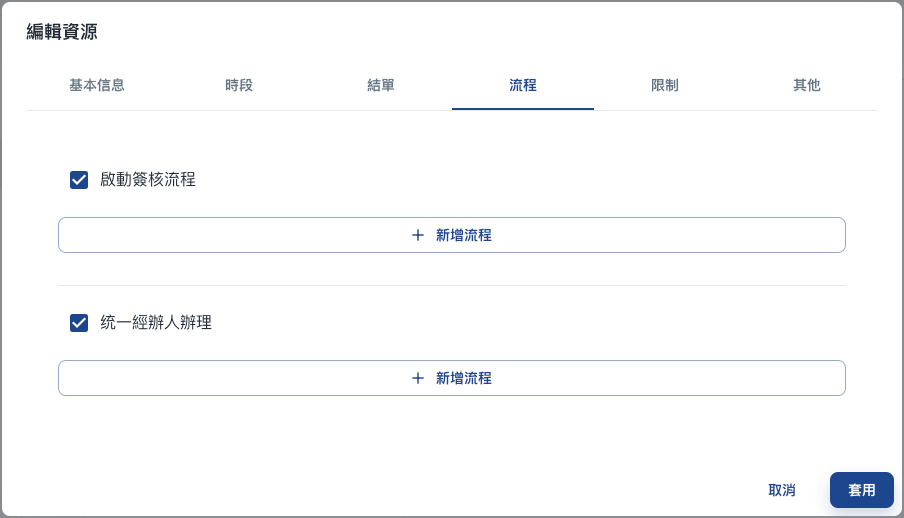
The 'Process' section defines the workflows for Approvals and Delivering processes, ensuring smooth and efficient management of resource-related tasks. The Delivering process is closely associated with the settlement time, automatically sending tasks to the administrator's to-do list at the specified daily settlement time for review and action.
Approvals
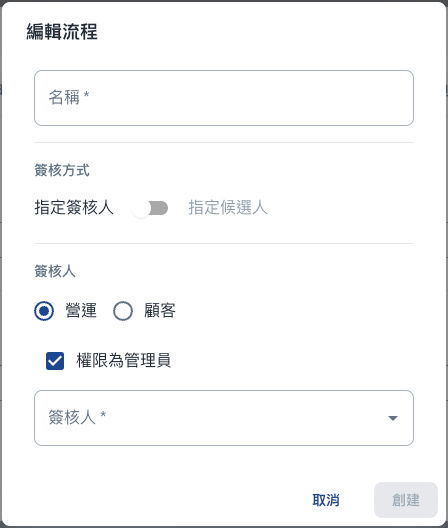
Administrators can configure approval workflows to ensure that resource bookings or changes are reviewed and authorized before being finalized. Key features include:
- 🔄 Enable Approval Workflow: Activate the approval process for specific resources, requiring designated approvers to review and approve requests.
- ➕ Add Workflow: Define custom approval workflows by specifying approvers, approval levels, and conditions for triggering the workflow.
Delivering

The Delivering process is designed for handlers, ensuring that tasks related to resource bookings are systematically managed. Once an order is created, it is assigned to the designated handler. The booking is only finalized after the handler processes the task. Key features include:
- 🔄 Enable Delivering Workflow: Activate the delivering process for specific resources, requiring designated handlers to review and assign resource.
- ➕ Customizable Workflows: Define triggers and actions to tailor the task delivery process, ensuring tasks are assigned to the appropriate handlers or teams.
This process ensures that resource management tasks are handled efficiently, reducing manual effort and ensuring that bookings are completed only after proper review and processing.
Restrictions
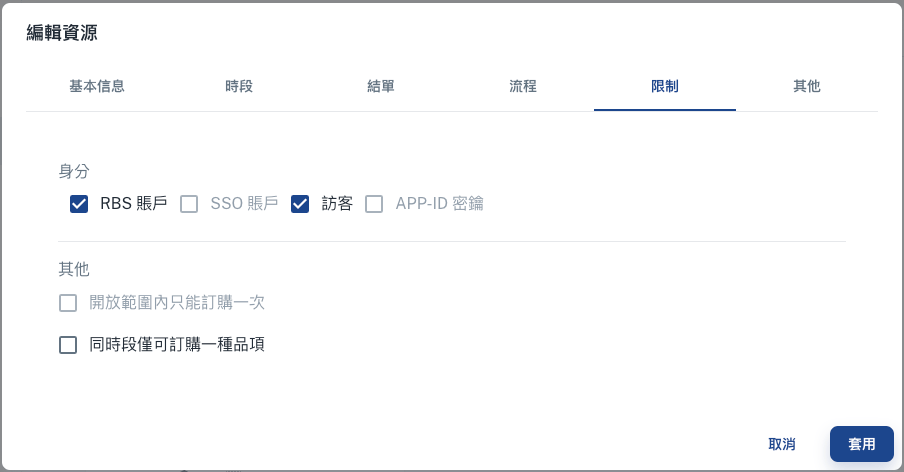
The 'Restrictions' section enables administrators to set specific rules and limitations for resource usage, ensuring compliance with organizational policies and preventing misuse. Key features include:
👤 Identity Restrictions: Define which user groups can access the resource. Options include RBS accounts, SSO accounts, visitors, or APP-ID authentication. This ensures that only authorized users can book or utilize the resource.
🔒 Purchase Limits: Restrict users to purchasing the resource only once within a defined scope, preventing duplicate bookings or misuse.
⏳ Simultaneous Booking Restriction: Limit users to booking only one type of resource at a time, ensuring fair access and avoiding overbooking.
These restrictions provide administrators with the flexibility to enforce policies and maintain control over resource allocation, ensuring that resources are used efficiently and equitably.
Others

The 'Others' section provides additional configuration options to enhance the flexibility and functionality of resource management. These settings allow administrators to customize the resource experience further, ensuring it aligns with organizational needs. Key features include:
📧 Email Notifications: Configure email alerts to notify users about their bookings.
🔔 Pop-Up Announcements: Enable pop-up messages to display critical announcements or reminders when users interact with the resource. This ensures that important information is communicated effectively.
🛸 Extension Fields: Import custom fields from the settings to assign specific locations or additional attributes to resources, providing users with clear and accurate information tailored to organizational needs.
These options empower administrators to provide a seamless and user-friendly experience while maintaining control over resource communication and accessibility.