My Reservations
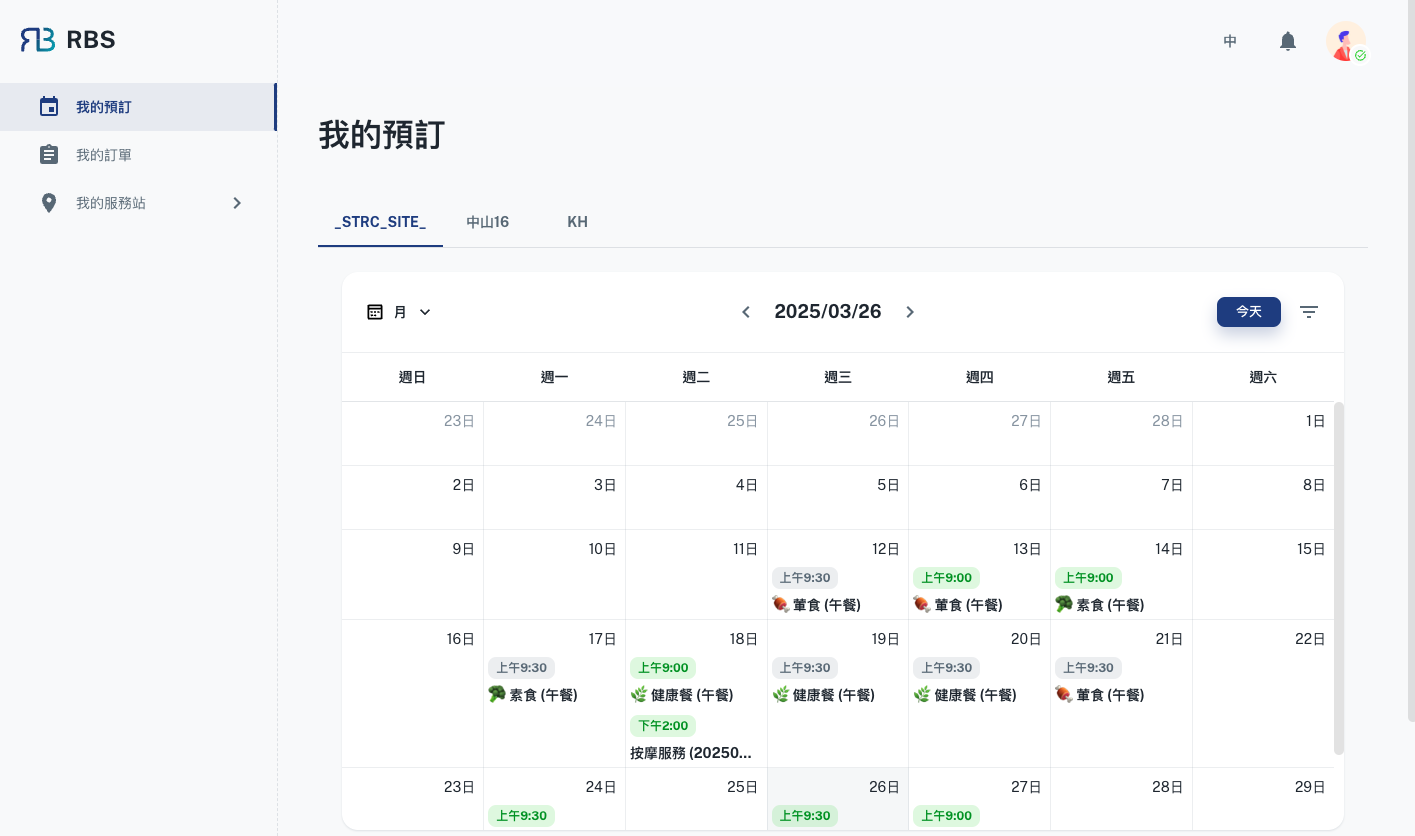
The 'My Reservations' section in your User's Dashboard provides a dynamic and interactive calendar view of all your bookings. This feature is designed to give you a clear and organized overview of your reservations, making it easy to manage your schedule effectively.
-
📅 Calendar View
The calendar provides an intuitive and visually organized way to view your bookings. Each reservation is displayed on the corresponding date, making it easy to track and manage your schedule.
-
🔄 Switch Views
To cater to different preferences, the calendar supports multiple views, such as monthly, weekly, daily and list layouts. You can easily switch between these views to get a broader or more detailed perspective of your reservations.
-
🔍 Filter by Date Range
The calendar includes a date range filter, allowing you to narrow down your view to a specific time period. This ensures that you can quickly focus on the reservations within the selected range.
-
🖊️ Manage Your Bookings
Each booking on the calendar is interactive, enabling you to take specific actions directly from the calendar interface. For example:
-
❌ Cancel Booking
If you need to cancel a reservation, simply click on the booking and select the cancel option. This provides a quick and hassle-free way to manage changes to your schedule.
-
📋 View Details
Clicking on a booking will also allow you to view detailed information about the reservation, including the resource, time, and any additional notes.
-
With these features, the 'My Reservations' calendar ensures that managing your bookings is both intuitive and efficient.