Find and Cancel Your Bookings
This guide shows you how to find a submitted booking in My Bookings (Booking History), check its approval status, and either terminate the entire order or cancel one reservation.
You booked the B3 space under “Day Parking.” You want to confirm that the order was created successfully. Your plans later change, so you need to decide whether to terminate the entire order or cancel only one time slot.
Before you start
- Sign in with the same RBS account used to submit the booking.
- Have at least one of these details ready: the booking item, date, or booking ID.
- If you booked as a guest, use the link in the confirmation email to track the booking instead.
Steps
1. Open your booking history
After signing in, open the user dashboard and select My Bookings (Booking History). Each record represents one submitted request and may contain one or more individual reservations.
Confirm the booking ID, item, date, time, and status shown in the list.
2. Find the booking
If the list is long, enter the order ID in the search field. You can also filter by Today, This Week, This Month, This Year, or a custom creation period, and add status filters such as Closed, In Progress, Dispatched, or Approved by Me.
Each service site appears on a separate tab. For this example, first select the site where you booked “Day Parking,” then locate the B3 order.
Do not identify a booking by item name alone. Similar bookings may exist, so verify the booking ID and time again before cancelling.
3. Check the order and approval progress
Select the order row to review the order information, reservation details, Approval History, and, when applicable, Handling History.
Statuses may include Preparing, Ready, In Progress, Dispatched, Closed, Cancelled, or Rejected. Also check which approver currently owns the request; an “In Progress” status alone does not mean that the complete workflow is finished.
Approval and handling workflows vary by service site. If a status is unclear, record the booking ID and ask the site administrator.
4. Choose what to cancel
Open the more_vert menu on the order:
- Terminate Process cancels an eligible request and affects the entire order.
- View Reserved List opens the individual reservations in the order so you can cancel one future reservation that belongs to you.
Orders that are dispatched, closed, cancelled, or rejected can no longer be terminated; the action will be disabled.
5. Terminate the entire order
Choose Terminate Process only when the whole request is no longer needed. In the confirmation dialog, verify the order ID before confirming.
If you only need to cancel one date or time slot, do not terminate the order. Continue to the next step.
6. Cancel one reservation
Choose View Reserved List, find the date or time slot to cancel, and select Cancel on your future reservation. Confirm the warning that the action cannot be undone.
Expired reservations cannot be cancelled, so their Cancel button is disabled.
Cancellation may be irreversible. If you only need a different date, time, or quantity, confirm that the new option is available before cancelling the original booking and submitting a new one.
Verify the result
After cancelling, confirm that:
- When terminating the whole process, the order is still searchable by ID and its status has changed.
- When cancelling one reservation, that entry appears as cancelled in Reserved List.
- The date view in Calendar reflects the latest status.
If the status does not update, reload the page. If it still does not change, provide the booking ID to the site administrator.
Troubleshooting
I cannot find the booking I just submitted
Confirm that you are signed in with the original account and viewing the correct service-site tab. Guest bookings may not appear in an account’s history; use the email sent after submission instead.
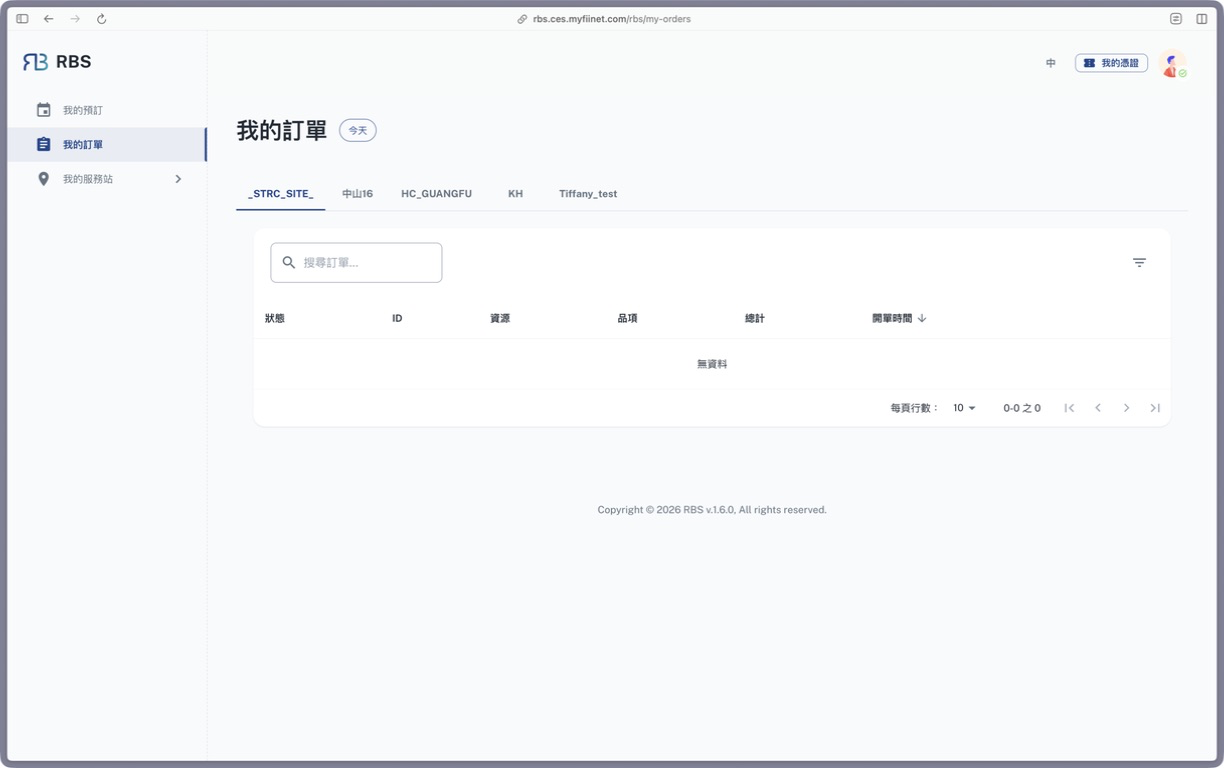
When no record matches, “No Data” appears in the table. Check the service-site tab and filters first. The screenshot is from the Traditional Chinese user site, v1.6.0; “我的訂單” corresponds to My Bookings (Booking History) in this guide.
No cancellation action is available
Dispatched, closed, cancelled, or rejected orders cannot be terminated. Expired individual reservations also cannot be cancelled. Contact the site administrator with the order ID, item, and time.
I want to change the date or time
The current interface does not provide direct editing for a time-based booking. Confirm that the new slot is available, cancel the original reservation, and follow Book a Day Parking Space to submit another booking. Quantity-based items may offer Edit Quantity; follow the options shown for that item.
I still receive notifications after cancellation
Treat the latest status in My Bookings (Booking History) and Reserved List as authoritative. If the record is cancelled but notifications continue, send the order ID and notification time to the site administrator.
Next
- Use Calendar to review other bookings by date.
- For a different date or time, book a new Day Parking space.